
MyRadar Weather Radar Pro
ACME AtronOmatic LLCWeather
4.85.02K Reviews
- Version
- Varies With Device
- Installs
- 100.00K
- Age Rating
- Everyone
Screenshots

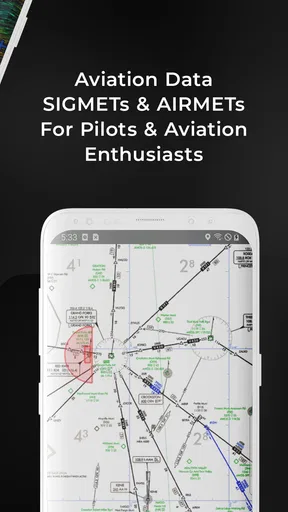
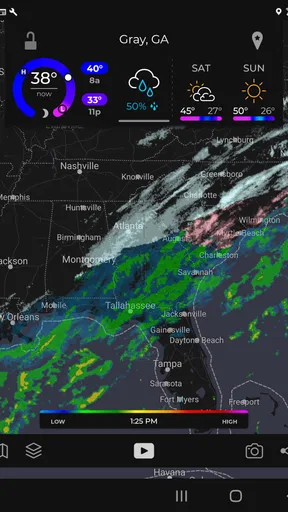
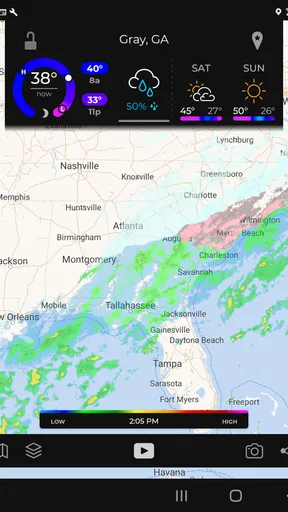
Our Review of MyRadar Weather Radar Pro
 Analysis by Appyee
I’m drawn to weather apps that let me answer a practical question quickly: is rain moving toward me, and should I change what I’m doing? MyRadar Weather Radar Pro is built around that kind of map-first check. Instead of making a long forecast the whole experience, it puts radar at the center and lets me inspect conditions visually. That approach is useful when a broad forecast says “showers” but I want a better sense of where they are and how they relate to my plans.
It’s a weather app from ACME AtronOmatic LLC, and its focus is clear: radar, temperature views, weather warnings, hurricane information, and widgets. I find that mix most valuable when I need context rather than just a single temperature or a quick sun-and-cloud icon. The app has an average rating of 4.8 from around 9,700 ratings, with about 4,700 written reviews and over 100,000 installs. Those figures suggest it has found a steady audience, though they don’t replace deciding whether its map-based style suits the way you check the weather.
What the price does—and doesn’t—tell you
MyRadar Weather Radar Pro costs $5.99, and it also offers in-app purchases priced from $2.99 to $29.99 per item. I’d treat those as two separate decisions: whether the Pro app itself is worth its asking price, and whether any optional purchase fits a specific need. The listed price makes this a paid app rather than a free download, so it’s sensible to be clear about that before installing it.
I wouldn’t assume that paying once automatically includes every extra available through in-app purchases. If you’re considering an add-on, check its description in the app and decide based on the feature you actually need. That’s especially relevant if you’re attracted by specialist weather layers: a casual user may not benefit from them, while someone with a particular use could find the extra detail worthwhile. The content rating is Everyone, and the app was released on September 17, 2013.
How the radar fits into everyday weather checks
The main value here is not simply that a map exists; it’s that a map can help me make a more informed short-term choice. A forecast gives a useful overview, while radar lets me look at precipitation in relation to nearby places. If I’m deciding whether to start a walk now or wait, that visual context can be more helpful than repeatedly rereading a general forecast. I still treat radar as one input, not a promise that conditions at my exact location will match the map.
First Impressions and Interface
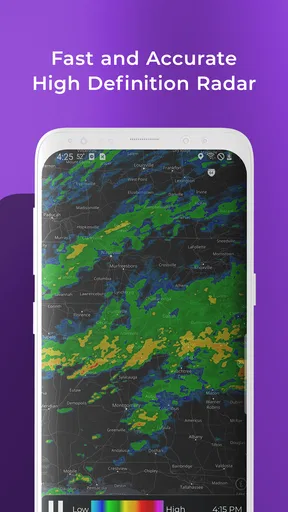
Right off the bat, MyRadar Weather Radar Pro greets you with a slick and user-friendly interface. It’s intuitive, which I love because, let’s be honest, no one wants to play hide and seek with buttons when they’re trying to check if they need an umbrella. The main screen is dominated by a vibrant radar map. It’s colorful, yet not overwhelming, and the way it updates in real-time is pretty cool, especially if you’re a weather geek like me.
The app’s navigation is straightforward, allowing quick access to various features with minimal fuss. You can zoom in and out on the radar with a simple pinch gesture, which really helps when you want to get a closer look at specific areas.
Features That Stand Out
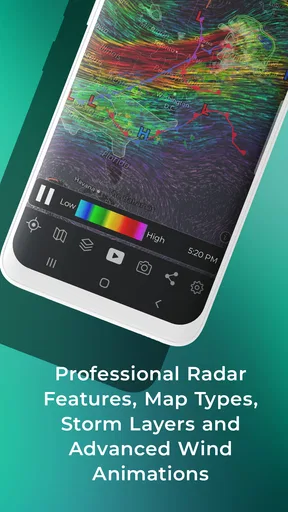
One of the standout features of this app is its detailed radar capabilities. You can see everything from temperature overlays to hurricane tracks, and even the wind patterns. These layers can be toggled on and off, giving you control over how much information you want to see at any given time.
Another nifty feature is the ability to set up notifications for severe weather alerts. This is especially handy if you live in an area prone to sudden weather changes. The app keeps you informed with timely alerts, so you’re not caught off guard by a surprise thunderstorm or, heaven forbid, a tornado.
Reading the map without overreading it
A useful habit is to start with the simplest view, locate the area you care about, and only then turn on another layer if it answers a real question. Temperature, wind, and precipitation can all matter, but displaying everything at once can make a map harder to interpret. I’d use the radar first to understand the broad pattern, then add a layer when I need more context—for example, checking wind before an outdoor activity rather than treating every colorful overlay as equally important.
For a realistic everyday example, imagine I’m planning to walk home after work and clouds are gathering. I can check the radar around both my current location and home, then decide whether to leave now, wait, or bring rain gear. I would still check the alert information and use ordinary judgment if the weather looks threatening; a moving map helps with timing, but it isn’t a guarantee about what will happen on one street. Keeping the decision modest is part of using the app well.
The ability to switch locations also lends itself to planning for someone else. I might check conditions near a family member’s home before calling to suggest a change of plans, or look at a destination before setting out. That is more useful than repeatedly changing the phone’s primary location, but it also means I should confirm which place the map is showing before acting on it. A quick location check avoids the easy mistake of reading the right weather in the wrong town.
Performance and Usability
Performance-wise, MyRadar doesn’t disappoint. It loads quickly, and I didn’t notice any significant lag even when switching between different features or zooming in on the map. The app is also light on battery consumption, which is always a bonus for those of us who seem to constantly be in battery-saving mode.
The radar data is updated every few minutes, which ensures that you’re always looking at the most current weather conditions. This real-time data can be a lifesaver if you’re planning any outdoor activities and need to know exactly when that rain is going to hit.
What to expect from a radar-first approach
Compared with a typical forecast app that opens on a daily outlook, this one makes more sense when the question is “what is moving nearby?” rather than “what will the whole week feel like?” I like that distinction because it helps set realistic expectations. A radar view can be excellent for watching a rain band approach, but it is less convenient if all I want is a quick list of upcoming daily conditions. In that situation, a simpler forecast screen may be faster.
There is also a judgment call in how much attention to give to updates. Refreshing a map repeatedly can make a small change feel more important than it is, especially when plans are flexible. I’d check once when making a decision, then return if conditions change or a warning appears. The app is most useful as a practical aid, not as a reason to monitor every movement throughout the day.
Customization Options
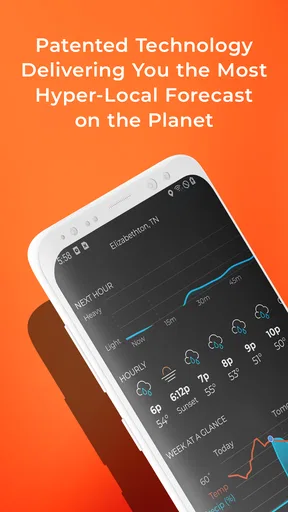
Customization is another area where MyRadar shines. You can tailor the app to suit your needs, changing things like map types and units of measurement. I found the ability to set different locations particularly useful. Whether you want to keep tabs on the weather at home, work, or a relative’s place, you can easily switch between locations with just a tap.
For those who like to geek out on weather data, there are additional features available through in-app purchases. These include aviation layers, which provide data that’s more detailed and specific, making it great for pilots or anyone interested in aviation weather conditions.
Who gets the most out of the paid app
I can see the strongest case for this app if radar is part of your regular routine: people who plan outdoor work, walks, sports, or trips around changing conditions may appreciate having a map ready to inspect. It can also suit weather enthusiasts who enjoy switching layers and following storms, and the aviation-related option may appeal to users who know they need that kind of information. In those cases, the value comes from using the relevant view repeatedly, not from collecting features for their own sake.
I’d be less likely to recommend it to someone who only checks the temperature once in the morning, wants a basic weekly forecast, or prefers a free app and has no particular interest in radar. The $5.99 purchase is easier to justify when the map solves a recurring problem. If you only open a weather app occasionally, a simpler alternative may cover your needs without asking you to pay up front.
Widgets can make routine checks more convenient by bringing weather information closer to the home screen, but I’d still open the app when the decision depends on the radar itself. A compact glance and an interactive map serve different purposes: the first is handy for a quick check, while the second is where I would inspect nearby movement or choose another location. That distinction helps keep the widget useful without expecting it to replace the app’s main strength.
Trade-offs before you decide
The map-first design is both the main attraction and the main compromise. It gives visual context quickly, but users who prefer a clean list of hourly and daily forecasts may find the emphasis less direct. Layers also reward a little attention: switching several on at once can clutter the view, and a detailed display is not automatically a clearer one. I’d keep only the information relevant to the decision in front of me.
There’s a cost trade-off too. The app is paid, and optional purchases sit on top of that, so I would not buy extras simply because they are available. If you are comparing it with a standard weather app, ask whether you will actually use the radar and specialist layers often enough to make the purchase worthwhile. The right answer depends on your habits, not on how many controls an app can show.
Final Thoughts
In the crowded world of weather apps, MyRadar Weather Radar Pro holds its ground with a combination of powerful features and an easy-to-use interface. It’s like having a mini weather station right in your pocket. Whether you’re a weather enthusiast or just someone who wants to know if they need a raincoat, this app has something for everyone.
So, if you’re on the hunt for a reliable and feature-packed weather app, give MyRadar a try. It’s one of those apps that once you start using it, you’ll wonder how you ever lived without it.
My own verdict is more specific: I’d choose it when I expect to use its radar often, want to compare nearby locations, or have a clear reason to explore its additional layers. I’d skip it if a straightforward forecast is all I need or if I’m not comfortable paying for an app before knowing that I’ll use its particular style. Its Everyone age rating makes it broadly accessible, but the real question is whether a map-led way of checking weather fits your day.
Overall, I think the best way to approach the purchase is to decide what job I want the app to do before I spend more on optional features. For me, that job is visual short-term context: seeing how weather around a route or destination may affect a plan. When that is useful, the interface and location switching make sense together. When it isn’t, a simpler forecast app is likely the more sensible choice.
Verdict
Strengths of MyRadar Weather Radar Pro
- Highly accurate weather forecasts.
- Intuitive and user-friendly interface.
- Real-time radar updates.
- Customizable alerts for severe weather.
- Supports multiple layers for detailed analysis.
Limitations of MyRadar Weather Radar Pro
- Ads can be intrusive without upgrade.
- Requires a strong internet connection.
- Battery consumption is relatively high.
- Limited features in the free version.
- Occasional lag on older devices.
Other Releases by ACME AtronOmatic LLC
View All
MyRadar Weather Radar
Weather4.8
Similar Picks in This Category
View All
Weather - By Xiaomi
Xiaomi Inc.4.1

Weather & Radar Forecast
WetterOnline4.8

Weather
OneLouder Apps4.6

AccuWeather: Weather Radar
AccuWeather3.6

The Weather Channel - Radar
The Weather Channel4.6

1Weather Forecasts & Radar
OneLouder Apps4.3
Frequently Asked Questions
What features does MyRadar Weather Radar Pro offer?
MyRadar Weather Radar Pro provides real-time weather updates, advanced storm tracking, and high-definition radar images. Users can receive alerts for severe weather conditions and customize their view with various map layers and overlays. The Pro version eliminates ads, offering an uninterrupted experience along with additional premium features.
Is MyRadar Weather Radar Pro user-friendly?
Yes, MyRadar Weather Radar Pro is designed with a user-friendly interface, making it easy to navigate for both beginners and experienced users. The intuitive layout allows users to quickly access weather details, customize alerts, and view radar imagery without a steep learning curve.
How accurate are the weather forecasts provided by MyRadar Weather Radar Pro?
MyRadar Weather Radar Pro is known for its accuracy, using data from reputable sources like the National Weather Service. The app updates frequently to provide current conditions and forecasts, making it reliable for tracking weather patterns and planning outdoor activities.
Does MyRadar Weather Radar Pro require an internet connection?
Yes, MyRadar Weather Radar Pro requires an active internet connection to provide real-time weather updates and radar imagery. While some cached data may be available offline, most features, including live alerts and map updates, need connectivity to function properly.
Is there customer support available for MyRadar Weather Radar Pro users?
Yes, MyRadar Weather Radar Pro offers customer support through its website and app. Users can access FAQs, troubleshooting guides, and contact options for technical assistance. Support is available to help with any issues related to app functionality or account management.
